
Skip to content
  • 7400 Union Park Ave Suite 101

  • About
  • Live Chat
Quomation Insurance Services
  • Home
  • Products
    • AgencyStream Manage
    • AgencyStream Quote
    • AgencyStream Portal
    • IT Consulting Projects
  • News
  • Announcements
  • Live Chat
  • Contact
801.226.1395

Contact us

Quomation Insurance Services
  • ">
  • 801.226.1395

How to Set Up the Client Search

Knowledge Base

14
  • AgencyStream Quote
    • How to Bridge a Quote to AgencyStream Manage
    • How to Create an Auto Quote
    • How to Create an ID Card
  • AgencyStream Manage
    • Commercial Equipment Tab
    • How to Create a Certificate of Liability
    • How to Create a New Client
    • How to Create a Payment Due Date Report
    • How to Create a To-Do Item
    • How to Create a Recurring To-Do Item
    • How to Create a Reminder on the Dashboard
    • How to Run IVANS
    • How to Run Non-IVANS
    • How to Set Up the Client Search
  • AgencyStream Portal
    • Agency Portal Setup

Announcements

3
  • Quomation Releases New Website
  • January 2024 Newsletter
  • March 2023 Newsletter
View Categories
  • Home
  • Documentation
  • Knowledge Base
  • AgencyStream Manage
  • How to Set Up the Client Search

How to Set Up the Client Search

NOTE: The changes made to the Search Options will only impact your account

Step 1: Click on the filter icon

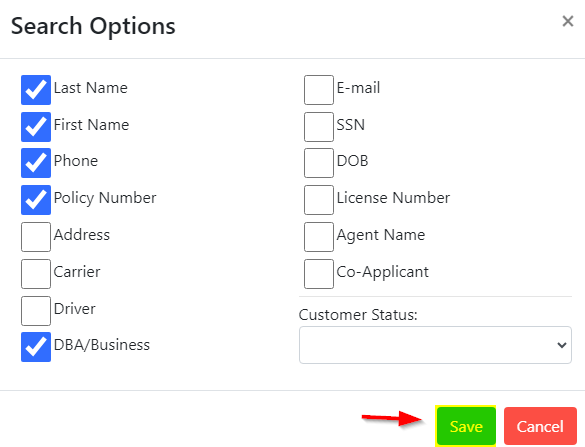
Step 2: Check the checkboxes that you would like AgencyStream Manage to use when locating the clients, and then click Save
Updated on October 28, 2024

    How to Run Non-IVANSCommercial Equipment Tab
    Quomation Insurance Services

    Contact

    • (801) 226-1395

    • PO BOX 982941 Park City UT 84098-2941

    Open Hours

    Mon – Fri: 7:00 am to 5:00 pm Mountain Time Closed Sat/Sun

    Newsletter

    Subscribe to our newsletter to get our latest update & news.

    801.226.1395

    Contact Us

    www.quomation.com Copyright © 2023-2026